

Filter Regarding using JavaScript
Introduction:
In this blog we will learn how to filter regarding based on another option set field. Also, we shall understand how we can set the default view for regarding.
Solution:
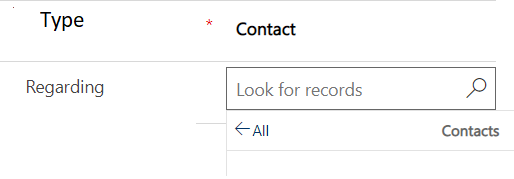
The below script will run on field change of “Type”, this is the option set based on which the regarding will be filtered.
 Regarding: function (execContext)
{
        var formContext = execContext.getFormContext();
        if (formContext.getAttribute("type").getValue() != null) {
            Type = formContext.getAttribute("type").getValue();
            switch (Type)
{ case 1:    formContext.getControl("regardingobjectid").setEntityTypes(["contact"]);               formContext.getControl("regardingobjectid").setDefaultView("{00000ABC-0000-0000-00BG-000010000147}");
  break;
  case 2: formContext.getControl("regardingobjectid").setEntityTypes(["quote"]);       formContext.getControl("regardingobjectid").setDefaultView("{00000ABC-0000-0000-00BG-000010000147}");
  break;
   }
        }
             }
Here, the Entity Type- will be entity you want to show in regarding and default view will be the view whose id is set in this script.
Output:
Related posts:

Resolving SSL/TLS Secure Channel Trust Errors in Dynamics 365 Finance and Operations

How to change a Bill of material (BOM) item on a production order
![Shopify Meets Dynamics 365 Finance and Operations: A Guide to Integration [Part 2]](https://www.cloudfronts.in/wp-content/uploads/2024/12/DALL·E-2024-12-14-12.29.44-A-professional-illustration-depicting-the-integration-between-Shopify-and-Dynamics-365-Finance-and-Operations.-The-image-shows-Shopify-on-one-side-wit-150x150.webp)
Shopify Meets Dynamics 365 Finance and Operations: A Guide to Integration [Part 2]
