

D365FO – HTTP Error 503. The service is unavailable
Introduction:
In this blog, we will see how to resolve HTTP Error 503 – The service is unavailable in Microsoft Dynamics 365 Finance and Operations

Details:
For
resolving these kinds of errors, we have 2 solutions as of now. One is to do
from the front end that is LCS and the second is to do from the back-end that
is from Visual Studio
From LCS:
Reset the IIS from the LCS. Steps:
1. Go to LCS, login
2. Select the respective project, full details

3.
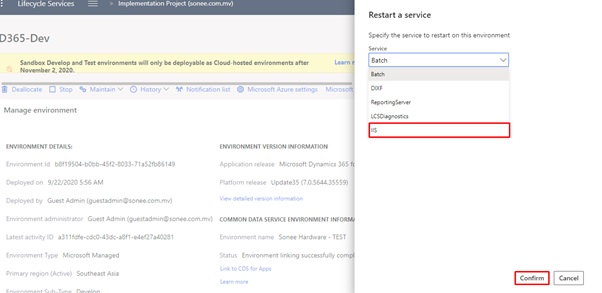
Go to Maintain -> Restart service

4.
Select IIS and confirm it
5.
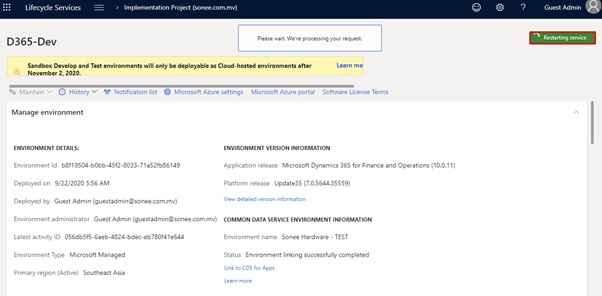
Wait till the service is being restarted
From
Visual Studio:
From the back-end, open the VM and follow the below steps:
1. Login to VM
2. Open the Visual Studio
3. Go to Dynamics 365 tab
4. Click on Restart IIS Express

That’s it. Build the project and go to the frontend and check the output how it looks like.
Thanks for reading and stay connected with us for more updates!!!
Jagdish Solanki | Senior Technical Consultant | CloudFronts
Business Empowering Solutions Team
“Solving Complex Business Challenges with Microsoft Dynamics 365 & Power Platform”
Related posts:

Resolving SSL/TLS Secure Channel Trust Errors in Dynamics 365 Finance and Operations

How to change a Bill of material (BOM) item on a production order

How to Set Up a Local Development Environment for D365 Finance and Operations Without Azure Costs
![Shopify Meets Dynamics 365 Finance and Operations: A Guide to Integration [Part 2]](https://www.cloudfronts.in/wp-content/uploads/2024/12/DALL·E-2024-12-14-12.29.44-A-professional-illustration-depicting-the-integration-between-Shopify-and-Dynamics-365-Finance-and-Operations.-The-image-shows-Shopify-on-one-side-wit-150x150.webp)
