

Identify Users having specific privileges
Introduction:
This blog consists of information on how you can find the users having specific privileges and in which role they have the privileges.
Solution:
Make use of the below Fetch XML to identify who has access to prvReadAccount related to his Role.
The fetch can be performed on System User level or for teams.
<fetch version="1.0" output-format="xml-platform" mapping="logical" distinct="false" >

<entity name="privilege" >

<attribute name="name" />

<link-entity name="roleprivileges" from="privilegeid" to="privilegeid" alias="pu" link-type="inner" >

<link-entity name="role" from="roleid" to="roleid" alias="rpu" link-type="inner" >

<attribute name="name" />

<link-entity name="systemuserroles" from="roleid" to="roleid" alias="sr" link-type="inner" >

<link-entity name="systemuser" from="systemuserid" to="systemuserid" alias="srr" link-type="inner" >

<attribute name="systemuserid" />

<attribute name="fullname" />

</link-entity>

</link-entity>

</link-entity>

</link-entity>

<filter type="and" >

<condition attribute="name" operator="eq" value="prvReadAccount" />

</filter>

</entity>

</fetch>
Response:
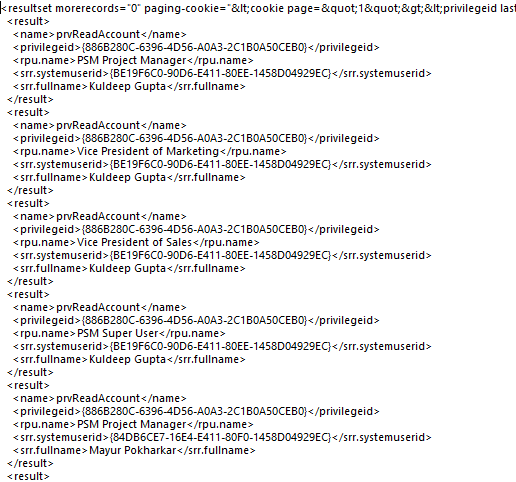
<fetch version="1.0" output-format="xml-platform" mapping="logical" distinct="false" >

<entity name="privilege" >

<attribute name="name" />

<link-entity name="roleprivileges" from="privilegeid" to="privilegeid" alias="pt" link-type="inner" >

<link-entity name="role" from="roleid" to="roleid" alias="rpt" link-type="inner" >

<attribute name="name" />

<link-entity name="teamroles" from="roleid" to="roleid" alias="tr" link-type="inner" >

<link-entity name="team" from="teamid" to="teamid" alias="trr" link-type="inner" >

<attribute name="teamid" />

<attribute name="name" />

</link-entity>

</link-entity>

</link-entity>

</link-entity>

<filter type="and" >

<condition attribute="name" operator="eq" value="prvReadAccount" />

</filter>

</entity>

</fetch>

Related posts:

Resolving SSL/TLS Secure Channel Trust Errors in Dynamics 365 Finance and Operations

How to change a Bill of material (BOM) item on a production order
![Shopify Meets Dynamics 365 Finance and Operations: A Guide to Integration [Part 2]](https://www.cloudfronts.in/wp-content/uploads/2024/12/DALL·E-2024-12-14-12.29.44-A-professional-illustration-depicting-the-integration-between-Shopify-and-Dynamics-365-Finance-and-Operations.-The-image-shows-Shopify-on-one-side-wit-150x150.webp)
Shopify Meets Dynamics 365 Finance and Operations: A Guide to Integration [Part 2]
