

Get Geolocation details using Xrm.Device for mobile devices
Introduction:
In this blog we will use the Xrm.Device Client API reference to get the location details as it provides methods to use native device capabilities of mobile devices.
Implementation:
Step 1 : First we have written a JavaScript code to get the Geolocation details and for this demonstration purpose we trigger this code to run on update of a field. We have created a custom field as Coordinates to store the details.
Syntax:
Xrm.Device.getCurrentPosition().then(successCallback, errorCallback)
Below shown is the Code:
var cordsLat = null;
var cordsLong = null;

var Scripting = {

Location: function () {
debugger;
Xrm.Device.getCurrentPosition().then(
function success(location) {
cordsLat = location.coords.latitude;
cordsLong = location.coords.longitude;
Scripting.UpdateRecord();
},
function (error) {
Xrm.Navigation.openAlertDialog({ text: error.message });
}
)

},

UpdateRecord: function () {
var id = Xrm.Page.data.entity.getId();
id = id.replace("{", "");
id = id.replace("}","");
var clientUrl = Xrm.Page.context.getClientUrl();
var req = new XMLHttpRequest();
req.open("PATCH", encodeURI(clientUrl + "/api/data/v9.0/accounts(" + id + ")"), true);
req.setRequestHeader("Accept", "application/json");
req.setRequestHeader("Content-Type", "application/json; charset=utf-8");
req.setRequestHeader("OData-MaxVersion", "4.0");
req.setRequestHeader("OData-Version", "4.0");
var body = JSON.stringify({
"cf_cordinates": "Latitude: " + cordsLat + " Longitude: " + cordsLong,
});
req.send(body);
}
}
Step 2: One important thing to note is the Xrm.Device control is only available in for mobile devices. When we run this script on a mobile device we get an error message and it does not go after turning on the GPS location of the device.
Step 3: To enable the script to work on the device navigate as shown below
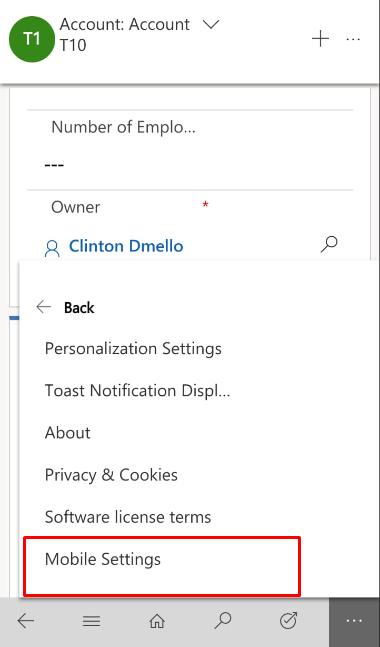
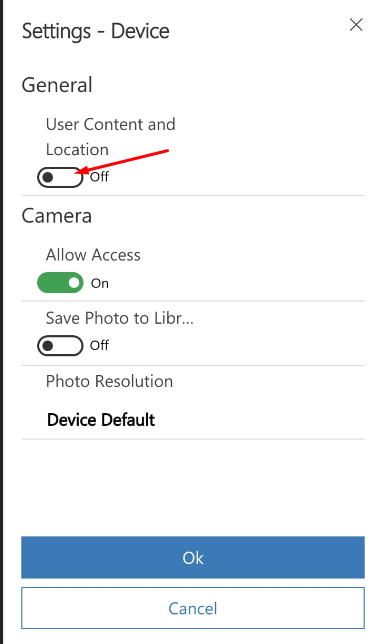

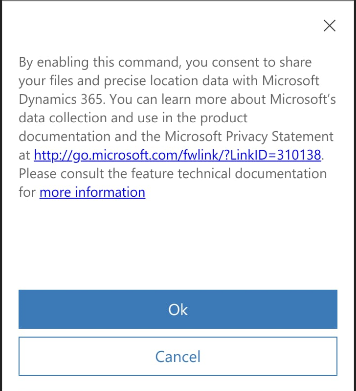 Once this is done and the script successfully runs we have to refresh the page and the details are updated on the Coordinates field as shown below

Related posts:

Resolving SSL/TLS Secure Channel Trust Errors in Dynamics 365 Finance and Operations

How to change a Bill of material (BOM) item on a production order
![Shopify Meets Dynamics 365 Finance and Operations: A Guide to Integration [Part 2]](https://www.cloudfronts.in/wp-content/uploads/2024/12/DALL·E-2024-12-14-12.29.44-A-professional-illustration-depicting-the-integration-between-Shopify-and-Dynamics-365-Finance-and-Operations.-The-image-shows-Shopify-on-one-side-wit-150x150.webp)
Shopify Meets Dynamics 365 Finance and Operations: A Guide to Integration [Part 2]
