

Setting Up Notifications in Azure API management Service
Introduction
In case you want the particular users (most preferably API management Admins) to receive notifications for new Subscribers to the Products used for API management endpoints, you will need to configure the following Settings.
Step 1: Go to the Notifications section in the left pane of your API management Service. Click on ‘Subscription requests’.

Step 2: Click on add email and enter the email id.

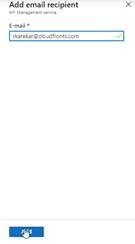
Step 3: Similarly, add an email for “New subscriptions” – for those who will receive the notifications as shown in steps 1 and 2.
Conclusion
Now the users whose Email ids have been setup will receive notifications for new Subscriptions which they can approve/deny based on whom they want to Grant Access to Endpoints to get the Subscription Key to Access the Endpoints.
Related posts:

Resolving SSL/TLS Secure Channel Trust Errors in Dynamics 365 Finance and Operations

How to change a Bill of material (BOM) item on a production order
![Shopify Meets Dynamics 365 Finance and Operations: A Guide to Integration [Part 2]](https://www.cloudfronts.in/wp-content/uploads/2024/12/DALL·E-2024-12-14-12.29.44-A-professional-illustration-depicting-the-integration-between-Shopify-and-Dynamics-365-Finance-and-Operations.-The-image-shows-Shopify-on-one-side-wit-150x150.webp)
Shopify Meets Dynamics 365 Finance and Operations: A Guide to Integration [Part 2]
