

Register/Create customer accounts of store employees on POS in D365 Retail(Commerce)
In Retail store you will need to assign address books i.e. One for store staff/employees and the second one for customers. If you fail to do that then on POS you will not be able to login or see/search for customers
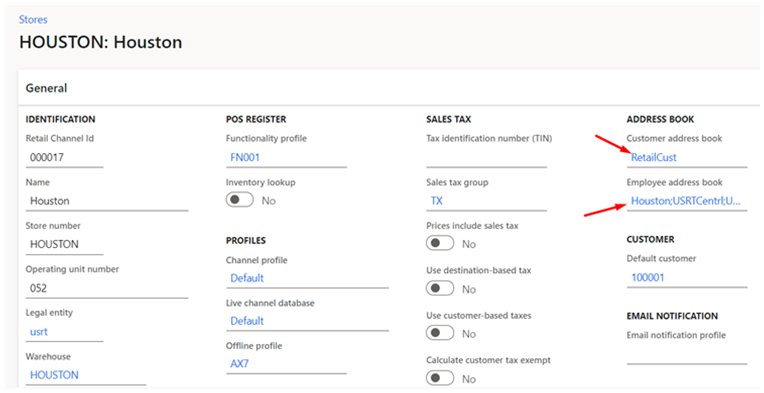
The above setup is the ideal for the store to function properly. However, some employees you want to create as customers too. You can do this manually or you can keep it automatic.
The meaning of automatics is, you will be able to search for store employees on POS and as soon as you click on their names, a customer with the same employee name will be created in the system.
To do this automatically on POS the below setup is required. As you can see ‘Houston’ address book is common in the store Customer address book and Employee address book

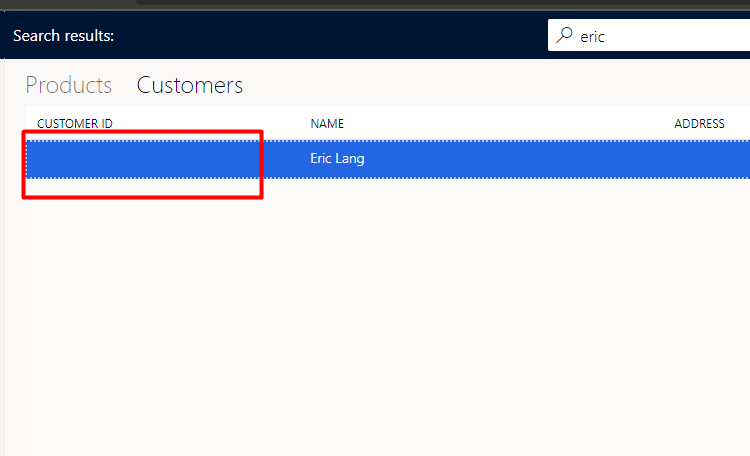
As a result of this setup, whenever you search for any employee on POS and select it, it will be created as customer in the system. Here, I have searched for Eric who is an employee and his customer ID field is blank as he is an employee. As soon as I click on it, it will create the customer in the system.
Hope this helps!
Related posts:

Resolving SSL/TLS Secure Channel Trust Errors in Dynamics 365 Finance and Operations

How to change a Bill of material (BOM) item on a production order

How to Set Up a Local Development Environment for D365 Finance and Operations Without Azure Costs
![Shopify Meets Dynamics 365 Finance and Operations: A Guide to Integration [Part 2]](https://www.cloudfronts.in/wp-content/uploads/2024/12/DALL·E-2024-12-14-12.29.44-A-professional-illustration-depicting-the-integration-between-Shopify-and-Dynamics-365-Finance-and-Operations.-The-image-shows-Shopify-on-one-side-wit-150x150.webp)
