

Display Month in Text Format Using Power Automate
Introduction:
Using Power Automate we can format date in various formats, however we had a requirement to populate date in document in June 10,2020 format.
Solution:
Here is how to achieve the same.
In this example I am formatting the System date which is obtained from function utcnow().
formatDateTime(utcNow(),’MMMM dd, yyyy’)
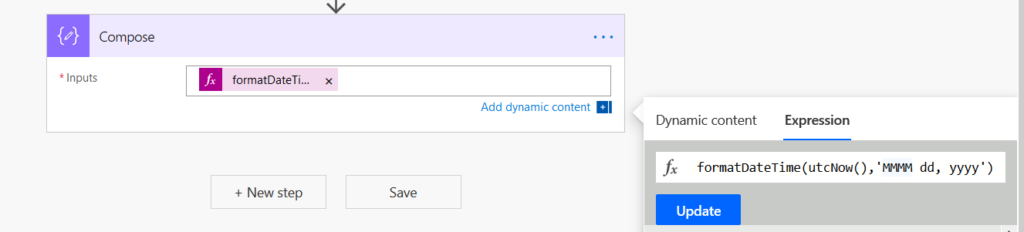
Output:

If you do not need to display the full Month in words, you can write “MMM” instead of “MMMM” and get the below output.

Related posts:

Resolving SSL/TLS Secure Channel Trust Errors in Dynamics 365 Finance and Operations

How to change a Bill of material (BOM) item on a production order
![Shopify Meets Dynamics 365 Finance and Operations: A Guide to Integration [Part 2]](https://www.cloudfronts.in/wp-content/uploads/2024/12/DALL·E-2024-12-14-12.29.44-A-professional-illustration-depicting-the-integration-between-Shopify-and-Dynamics-365-Finance-and-Operations.-The-image-shows-Shopify-on-one-side-wit-150x150.webp)
Shopify Meets Dynamics 365 Finance and Operations: A Guide to Integration [Part 2]
