

Map Newly Registered Portal Contacts to Existing CRM Contacts in Power Apps portal (Azure AD)
Power Apps Portal allows us multiple ways to authenticate users, users can login either by using a User ID and Password for local login or using SSO logins like Azure AD, etc.
Users can also register themself through the portal, when a user registers from the portal this creates a new contact with the user’s details and email ID in CRM.
But what if the contact already exists in your system?
To map the registered portal user with this existing contact instead of creating a new contact we need to enable/add a site setting.
Site Setting – Authentication/[Protocol]/[Provider]/AllowContactMappingWithEmail
More on Protocol & Provider – https://learn.microsoft.com/en-us/power-apps/maker/portals/configure/configure-portal-authentication
For Azure AD login which is provided by default, you can use the Site Setting – Authentication/OpenIdConnect/AzureAD/AllowContactMappingWithEmail
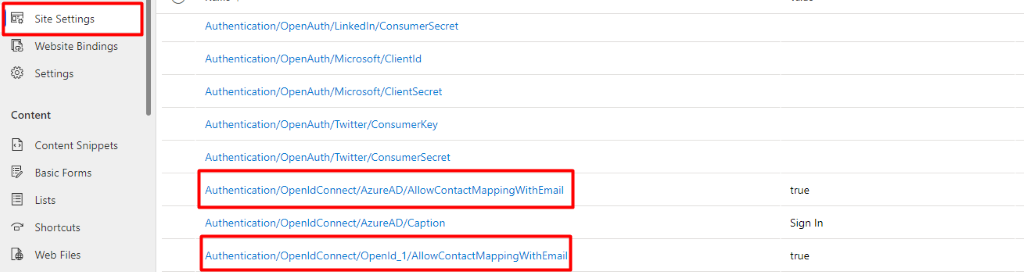
Reference Microsoft Document – https://learn.microsoft.com/en-us/power-apps/maker/portals/configure/configure-site-settings#portal-site-settings
I hope this helps 😉 !
Related posts:

Resolving SSL/TLS Secure Channel Trust Errors in Dynamics 365 Finance and Operations

How to change a Bill of material (BOM) item on a production order
![Shopify Meets Dynamics 365 Finance and Operations: A Guide to Integration [Part 2]](https://www.cloudfronts.in/wp-content/uploads/2024/12/DALL·E-2024-12-14-12.29.44-A-professional-illustration-depicting-the-integration-between-Shopify-and-Dynamics-365-Finance-and-Operations.-The-image-shows-Shopify-on-one-side-wit-150x150.webp)
Shopify Meets Dynamics 365 Finance and Operations: A Guide to Integration [Part 2]
