

Rollling up the multiple rows into a single row and column for SQL Server.
Problem:
Need a way to roll-up multiple rows into one row and one column. There is a way we can roll-up multiple rows into one row using pivot, but we need all of the data concatenated into a single column in a single row.
Solution:
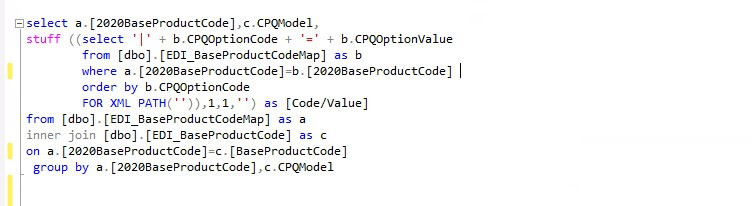
To achieve this we will use For XML Path Clause and STUFF Commands.
STUFF() Function
STUFF function is used to insert a string into another string. Basically, it deletes the characters from a source string and inserts another string at the specified position.
Syntax:
STUFF(Expression,Start, Length,Replacement_expression)
Here, Expression is an expression of the character data to be modified. Start is an integer, which specifies start position in Expression to delete and insert another string (i.e. Replacement_expression) from here and length is an integer, which specifies the number of characters to be deleted. Replacement_expression is a character expression to be inserted at the start position.
Example:
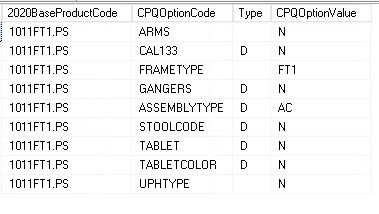
Data in table like this:
Query :
Output :

Related posts:

Resolving SSL/TLS Secure Channel Trust Errors in Dynamics 365 Finance and Operations

How to change a Bill of material (BOM) item on a production order
![Shopify Meets Dynamics 365 Finance and Operations: A Guide to Integration [Part 2]](https://www.cloudfronts.in/wp-content/uploads/2024/12/DALL·E-2024-12-14-12.29.44-A-professional-illustration-depicting-the-integration-between-Shopify-and-Dynamics-365-Finance-and-Operations.-The-image-shows-Shopify-on-one-side-wit-150x150.webp)
Shopify Meets Dynamics 365 Finance and Operations: A Guide to Integration [Part 2]
