

How to Sync Slicer in Power BI?
This blog will explain how to synch Slicer in Power BI desktop. In slicer syncing, all the pages where slicer has been applied will get synchronized.
How to apply slicer syncing?
Step1:
Select “Date Selection” slicer > Open View Menu > Click “Sync slicer”.
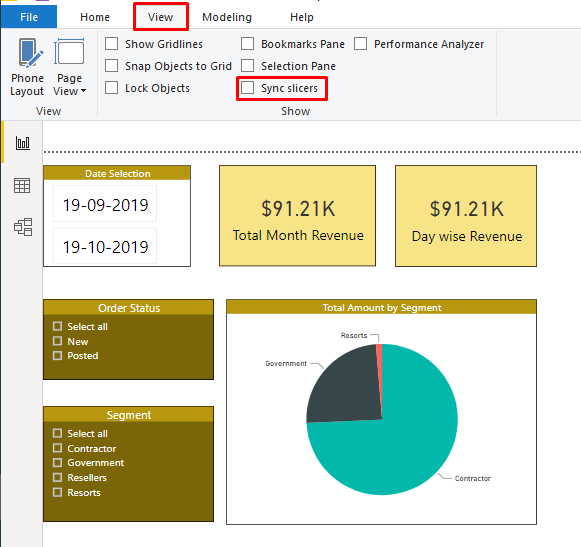
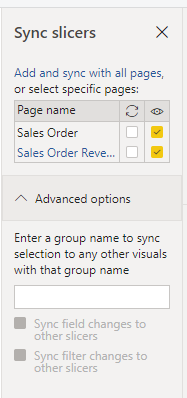
Step 2: When we click on slicer syncing it will open the setting for the slicer.
Based on our requirement we can select the different combinations to apply slicer and it will get synch across all tabs.
Hope this helps!
Related posts:

Resolving SSL/TLS Secure Channel Trust Errors in Dynamics 365 Finance and Operations

How to change a Bill of material (BOM) item on a production order
![Shopify Meets Dynamics 365 Finance and Operations: A Guide to Integration [Part 2]](https://www.cloudfronts.in/wp-content/uploads/2024/12/DALL·E-2024-12-14-12.29.44-A-professional-illustration-depicting-the-integration-between-Shopify-and-Dynamics-365-Finance-and-Operations.-The-image-shows-Shopify-on-one-side-wit-150x150.webp)
Shopify Meets Dynamics 365 Finance and Operations: A Guide to Integration [Part 2]
