

Hide table or column in Power BI
Introduction:
In this article we will read on how to hide a table or column in Power BI Web Service.
Scenario:
I have a Power BI Report with 3 Tables; Orders, People and Returns. I want to hide People table when I am publishing the Power BI Report on Power BI Web Service.
Steps:
- Open Power BI desktop file.
- Right click on the table or column you want to hide
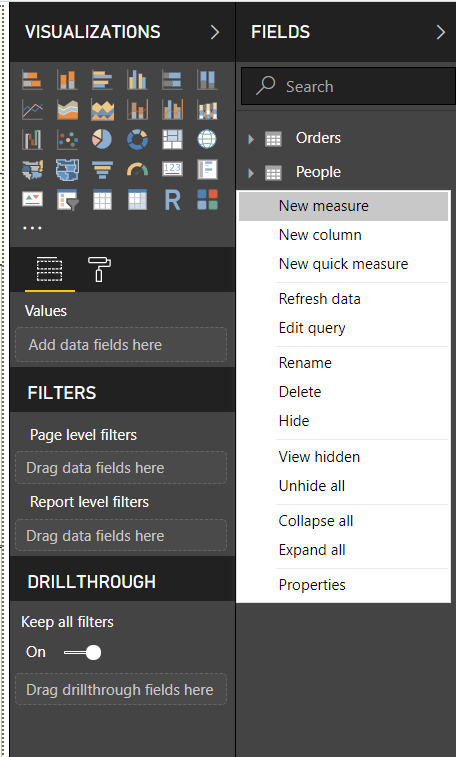
- Select Hide.
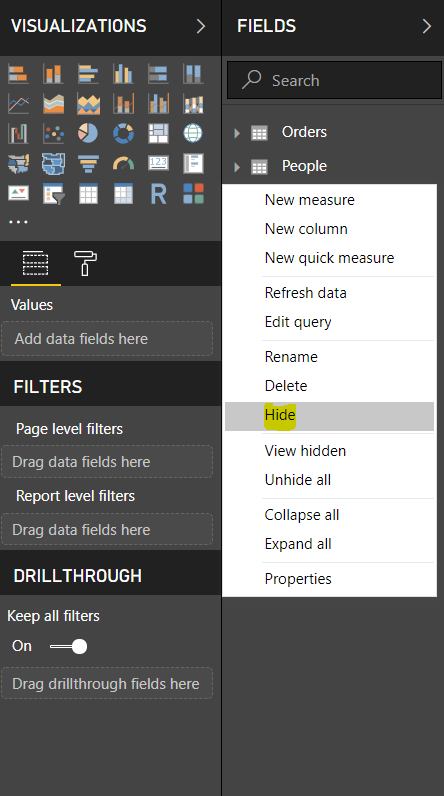
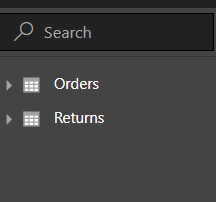
Voila! You are done. The Table People we not be visible in the Fields section of Power BI Desktop file.
You can find the table in the Modelling view as a Grey table.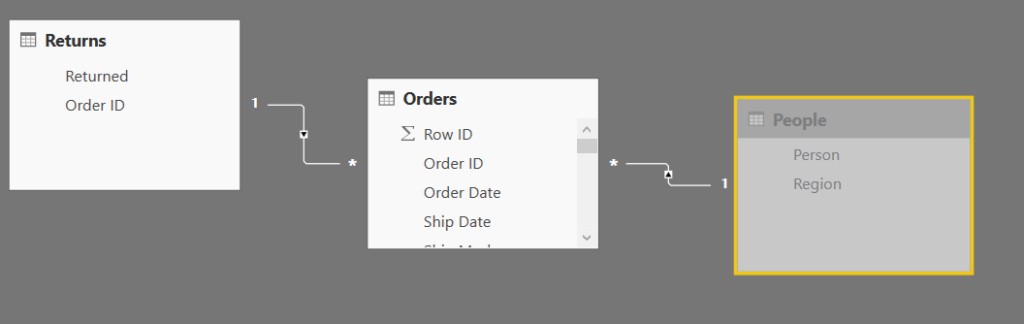
Related posts:

Resolving SSL/TLS Secure Channel Trust Errors in Dynamics 365 Finance and Operations

How to change a Bill of material (BOM) item on a production order
![Shopify Meets Dynamics 365 Finance and Operations: A Guide to Integration [Part 2]](https://www.cloudfronts.in/wp-content/uploads/2024/12/DALL·E-2024-12-14-12.29.44-A-professional-illustration-depicting-the-integration-between-Shopify-and-Dynamics-365-Finance-and-Operations.-The-image-shows-Shopify-on-one-side-wit-150x150.webp)
Shopify Meets Dynamics 365 Finance and Operations: A Guide to Integration [Part 2]
