

Hide Report page in Power BI report
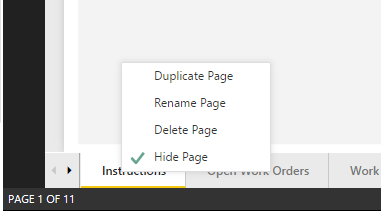
With Power BI latest release, you can now hide the page in Power BI reports, this page is available while you are developing and when you hide it by right click on the package and selecting Hide Page, then that page will not be available in Reading mode.

When you select the Hide page option then the option is checked as hide page.
Page is marked as dull colour to show that it is hidden.
When you publish this to your workspace then page will not be displayed in reading mode:

So, you can technically hide page in your power bi report if you don’t want to use them, but if the user has rights to edit the report then he can change the settings.
Related posts:

Resolving SSL/TLS Secure Channel Trust Errors in Dynamics 365 Finance and Operations

How to change a Bill of material (BOM) item on a production order
![Shopify Meets Dynamics 365 Finance and Operations: A Guide to Integration [Part 2]](https://www.cloudfronts.in/wp-content/uploads/2024/12/DALL·E-2024-12-14-12.29.44-A-professional-illustration-depicting-the-integration-between-Shopify-and-Dynamics-365-Finance-and-Operations.-The-image-shows-Shopify-on-one-side-wit-150x150.webp)
Shopify Meets Dynamics 365 Finance and Operations: A Guide to Integration [Part 2]
