

Expand & Collapse Matrix Row Headers in Power BI
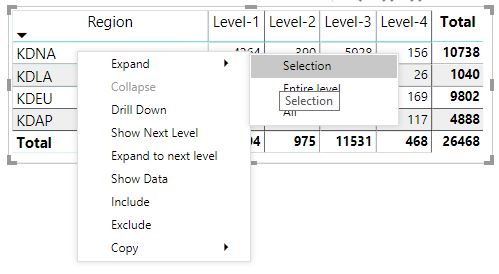
There are two ways you can expand/collapse row headers in matrix visualization. First one is through the Right-click menu. You will see options to expand/Collapse the specific record or row you clicked on, entire level or all down to the very last level of the hierarchy. In exactly same way you can collapse row headers as well.
Right- Click -> Expand/Collapse
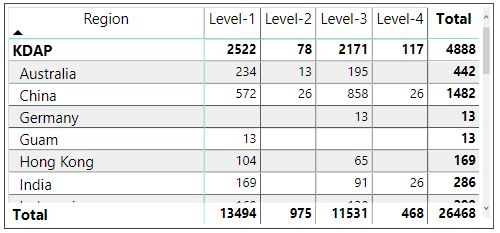
Also, you can add +/- buttons to the row headers through the formatting pane under the row headers card. By default, the icons will match the formatting of the row header. Additionally, you can format it with the color and size.
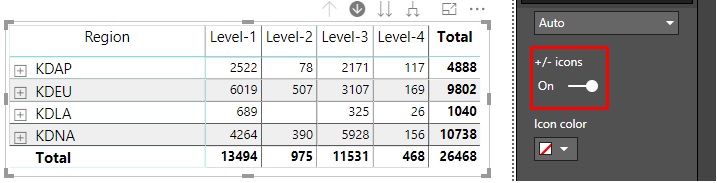
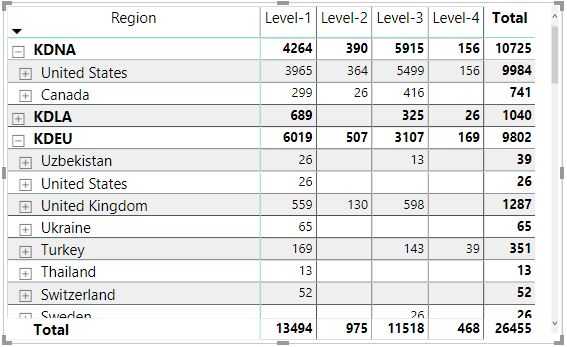
Once you have turned on the icons, it will work similarly to the icons of drill-down.
Related posts:

Resolving SSL/TLS Secure Channel Trust Errors in Dynamics 365 Finance and Operations

How to change a Bill of material (BOM) item on a production order
![Shopify Meets Dynamics 365 Finance and Operations: A Guide to Integration [Part 2]](https://www.cloudfronts.in/wp-content/uploads/2024/12/DALL·E-2024-12-14-12.29.44-A-professional-illustration-depicting-the-integration-between-Shopify-and-Dynamics-365-Finance-and-Operations.-The-image-shows-Shopify-on-one-side-wit-150x150.webp)
Shopify Meets Dynamics 365 Finance and Operations: A Guide to Integration [Part 2]
