

Dynamics GP Sales Invoice Unit Price always 0
Introduction:
Recently, we faced an issue with integrating Unit Price to Dynamics GP through GP Web Services using TIBCO Cloud Integration. We were integrating the Unit Price from Dynamics 365 but the Unit Price in an Invoice was created with $0 Price.
In this article, we will learn to resolve the issue for Dynamics GP Sales Invoice Unit Price always setting to $0 when creating through GP Web Services.
Resolution:
In Dynamics GP Web Service Policy Configuration for Update Sales Invoice Policy, you need to update the “Calculate Unit Price Behavior” to “Do Not Calculate”.
Also, make Sure that you have selected the right Company and assigned proper roles for the policy. The role should not be Default.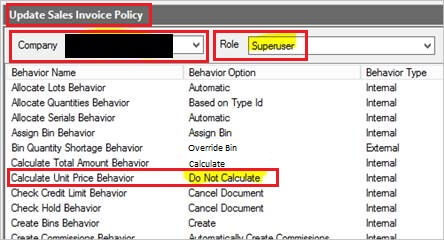
Note: The “Calculate Total Amount Behavior” should be “Calculate” otherwise the Unit Price will be always 0, even if you set the “Calculate Unit Price Behavior” to “Do not Calculate”.
Related posts:

Resolving SSL/TLS Secure Channel Trust Errors in Dynamics 365 Finance and Operations

How to change a Bill of material (BOM) item on a production order
![Shopify Meets Dynamics 365 Finance and Operations: A Guide to Integration [Part 2]](https://www.cloudfronts.in/wp-content/uploads/2024/12/DALL·E-2024-12-14-12.29.44-A-professional-illustration-depicting-the-integration-between-Shopify-and-Dynamics-365-Finance-and-Operations.-The-image-shows-Shopify-on-one-side-wit-150x150.webp)
Shopify Meets Dynamics 365 Finance and Operations: A Guide to Integration [Part 2]
