

Open document on click of button in D365 CRM using JavaScript
In this blog we will see how we can open a PDF document on click of button from a record in CRM
Let say we have User Guide button on Lead Entity and on click of User Guide button, a PDF document which is User Guide document should be open in next tab.
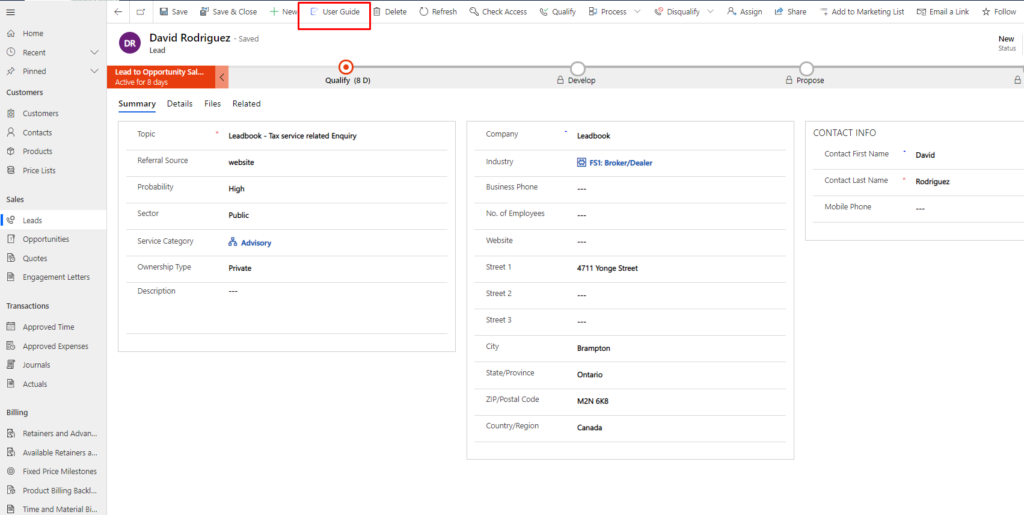
Solution
- Create a solution and add lead entity only.
Then open the same solution in XRM Toolbox – Ribbon Workbench
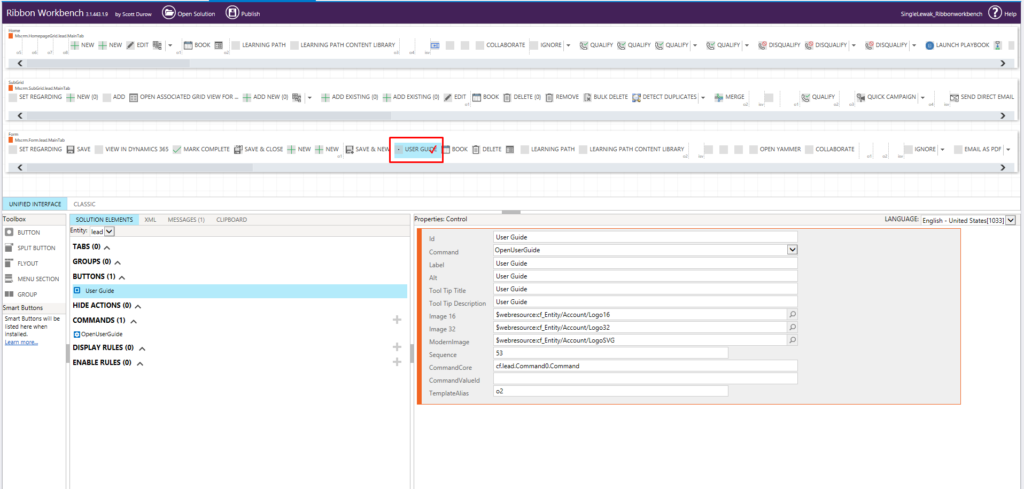

 var openUserGuide =
{
   //openUserGuide.userGuide
userGuide: function () {
    "use strict";
    Xrm.Navigation.openUrl("https://sinerleak.sharepoint.com/:b:/s/SingerLewak/EaQO2OWjWA1BnHFCCENV-6EBDkILbg3EfPSFLEu-KCeraw?e=ofVyVB");
    }
}
4. Add action to command and Publish the solution from XRM Toolbox

Output –

Related posts:

Resolving SSL/TLS Secure Channel Trust Errors in Dynamics 365 Finance and Operations

How to change a Bill of material (BOM) item on a production order

How to Set Up a Local Development Environment for D365 Finance and Operations Without Azure Costs
![Shopify Meets Dynamics 365 Finance and Operations: A Guide to Integration [Part 2]](https://www.cloudfronts.in/wp-content/uploads/2024/12/DALL·E-2024-12-14-12.29.44-A-professional-illustration-depicting-the-integration-between-Shopify-and-Dynamics-365-Finance-and-Operations.-The-image-shows-Shopify-on-one-side-wit-150x150.webp)
