

Lock the Columns of Views in Editable Grid of D365 CE
Introduction: This blog explain the steps to lock the columns of Editable Grid in D365 CE UCI.
Scenario: Lock the View columns of Editable Grid in D365 CE.
Steps:
Below are steps to be performed for locking fields of Editable Grid in View
- Create Business Rule to lock the field.
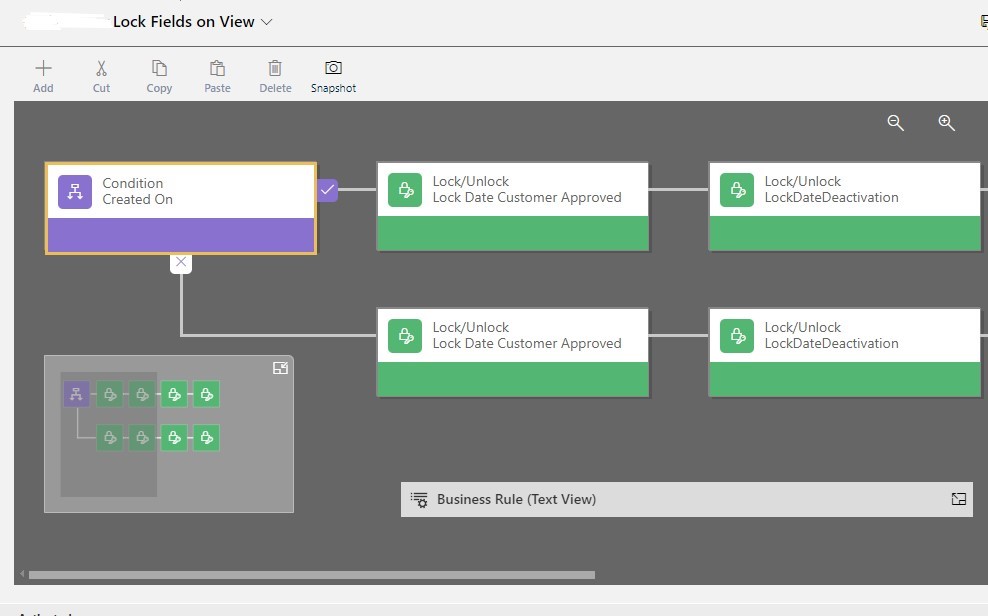
2. Mark the Scope of Business rule at Entity level

3. Editable Grid with locked columns in View
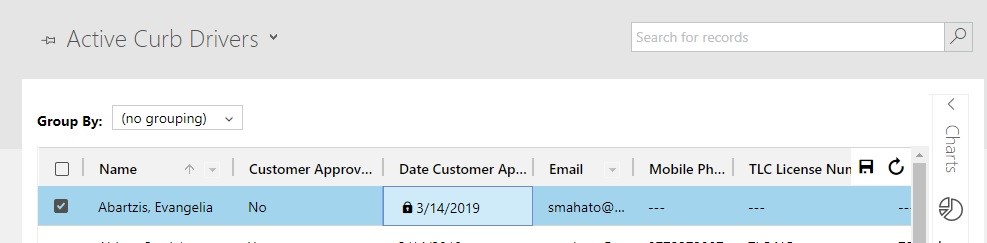
Note: Fields are locked for all Views and subgrid.
Conclusion: This blogs helps developers to lock columns of View and Subgrid in Editable Grid of D365 CE.
Related posts:

Resolving SSL/TLS Secure Channel Trust Errors in Dynamics 365 Finance and Operations

How to change a Bill of material (BOM) item on a production order
![Shopify Meets Dynamics 365 Finance and Operations: A Guide to Integration [Part 2]](https://www.cloudfronts.in/wp-content/uploads/2024/12/DALL·E-2024-12-14-12.29.44-A-professional-illustration-depicting-the-integration-between-Shopify-and-Dynamics-365-Finance-and-Operations.-The-image-shows-Shopify-on-one-side-wit-150x150.webp)
Shopify Meets Dynamics 365 Finance and Operations: A Guide to Integration [Part 2]
