

Global AIF Setting without which AIF Services will Not Work in AX 2012 R2
1. Go to AOT.
2. There is a Form called “AifGlobalSettings”.
3. Right Click & Open the form [Refer to the below snapshot of the form]
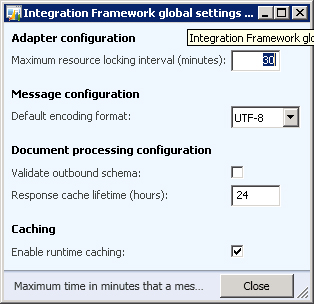
4. There is a check box called “Enable Runtime Caching”.
5. Make sure the check box is checked else the AIF services will NOT be accessible from outside.
Related posts:

Resolving SSL/TLS Secure Channel Trust Errors in Dynamics 365 Finance and Operations

How to change a Bill of material (BOM) item on a production order
![Shopify Meets Dynamics 365 Finance and Operations: A Guide to Integration [Part 2]](https://www.cloudfronts.in/wp-content/uploads/2024/12/DALL·E-2024-12-14-12.29.44-A-professional-illustration-depicting-the-integration-between-Shopify-and-Dynamics-365-Finance-and-Operations.-The-image-shows-Shopify-on-one-side-wit-150x150.webp)
Shopify Meets Dynamics 365 Finance and Operations: A Guide to Integration [Part 2]
