

Disable field on Click of Button in D365 CE using JavaScript.
Use Case – One of my requirements is to disable the field on click of button Reopen Project on Project form.
Let’s see how we can achieve this.
Solution –
- Create Web resource and add below function:
function markFieldsReadOnly(executionContext)
{
    try
    {
        var formContext = executionContext;
        formContext.getControl("cf_probonohoursnew").setDisabled(true);
        formContext.getControl("cf_probonohourvaluenew").setDisabled(true);

    }

 catch(e)
 {
    alert("An error occurred, please try later");
 }
}
Here my function name is “markFieldsReadOnly“.
- Create Solution in CRM which contains only a single entity on where we have button called “Reopen Project”.
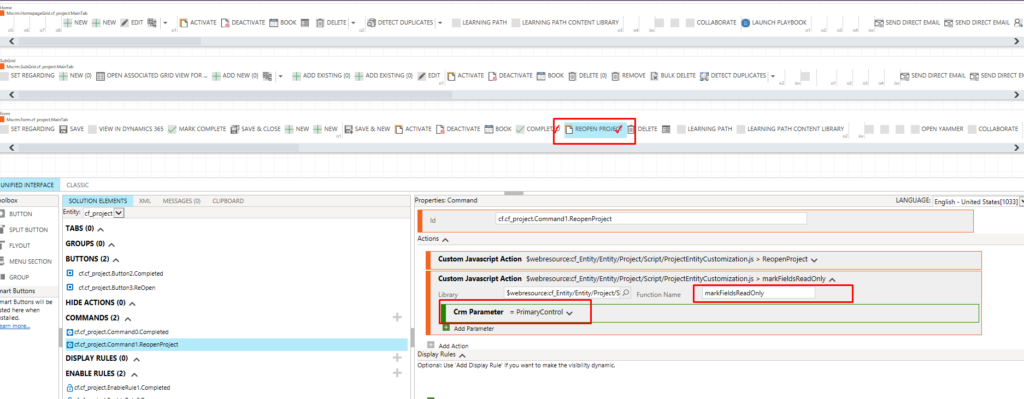
- Open same solution in XRM Toolbox -> Ribbon Customization.
In Order to get form Context from Ribbon, Pass CRM Parameter – Primary Control
Select Library which is your web resource and add Function Name and publish.
Hope this helps!
Related posts:

Resolving SSL/TLS Secure Channel Trust Errors in Dynamics 365 Finance and Operations

How to change a Bill of material (BOM) item on a production order

How to Set Up a Local Development Environment for D365 Finance and Operations Without Azure Costs
![Shopify Meets Dynamics 365 Finance and Operations: A Guide to Integration [Part 2]](https://www.cloudfronts.in/wp-content/uploads/2024/12/DALL·E-2024-12-14-12.29.44-A-professional-illustration-depicting-the-integration-between-Shopify-and-Dynamics-365-Finance-and-Operations.-The-image-shows-Shopify-on-one-side-wit-150x150.webp)
