

Disable field in Business Process Flow in D365 CE using JavaScript
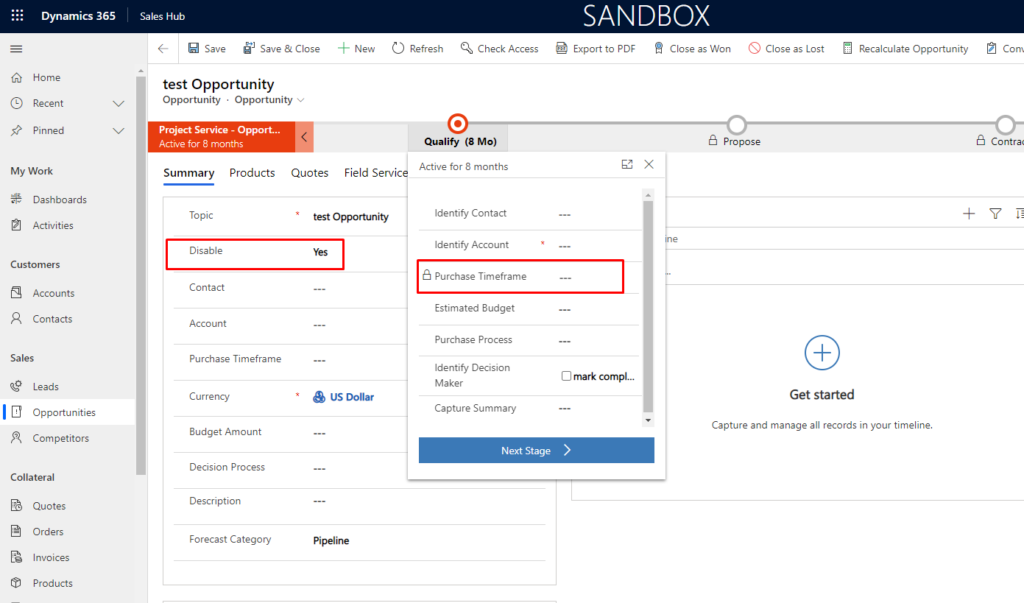
Use case – Our requirement is to mark field Purchase time Frame disabled in Business process flow on change of disable field(custom field) on opportunity form.
Let’s see how we can achieve this
Solution –
Step 1 – Create web resource with below function-
Add header_process before schema name of field.
Here schema name of purchase time frame field is purchasetimeframe. And after adding header_process_purchasetimeframe
 var opportunityCustomization =
 {
     //opportunityCustomization.disableField
     disableField : function(executionContext)
     {
         var formContext = executionContext.getFormContext();
         var disable = formContext.getAttribute("cf_disable").getValue();
         if (disable == true)
         {
             formContext.getControl("header_process_purchasetimeframe").setDisabled(true);
         }
     }
 }
Step 2: Add this web resource on form load, on Save and on change of the field. And try
Output –
Hope this helps !
Related posts:

Resolving SSL/TLS Secure Channel Trust Errors in Dynamics 365 Finance and Operations

How to change a Bill of material (BOM) item on a production order

How to Set Up a Local Development Environment for D365 Finance and Operations Without Azure Costs
![Shopify Meets Dynamics 365 Finance and Operations: A Guide to Integration [Part 2]](https://www.cloudfronts.in/wp-content/uploads/2024/12/DALL·E-2024-12-14-12.29.44-A-professional-illustration-depicting-the-integration-between-Shopify-and-Dynamics-365-Finance-and-Operations.-The-image-shows-Shopify-on-one-side-wit-150x150.webp)
