

Send a notification on Microsoft Teams when a record is created or Updated or Deleted in D365 CRM using Power Automate
In this blog, I am going to explain how to send a notification on Microsoft Teams when a record is created or Updated or Deleted in D365 CRM using Power Automate
Steps involved in Power Automate:
- Select trigger, in my case I used CDS connector when a record is created, updated or deleted.
- Select trigger condition, in my case I used Update.
- Select entity name, in my case I used Opportunities.
- Select Scope, Organization.
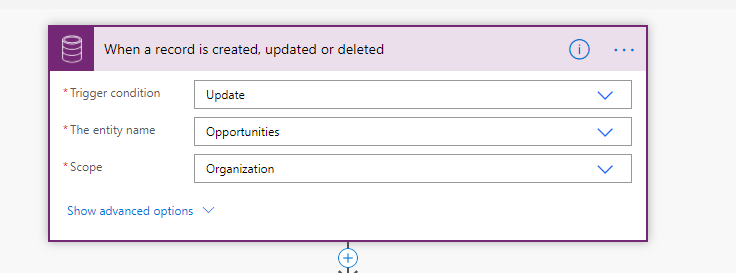
- Add new step to flow.

- Search Microsoft Teams and select Post a message.
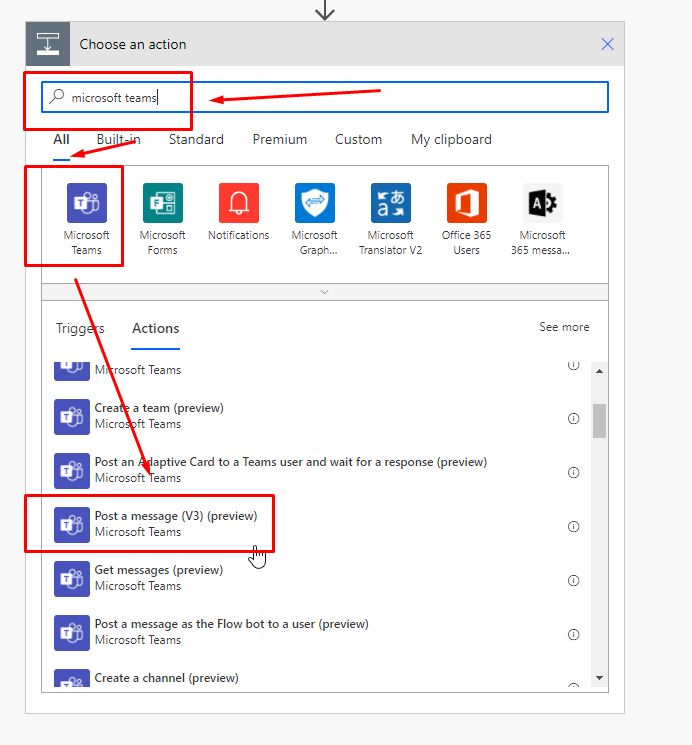
- Select Team where you want to post a message.
- Select Channel from team where you want to send a notification.
- Enter Message in message box.

- Click Save and check teams.
Congratulations! You have successfully created the required flow.
Hope this helps!!
Related posts:

Resolving SSL/TLS Secure Channel Trust Errors in Dynamics 365 Finance and Operations

How to change a Bill of material (BOM) item on a production order

How to Set Up a Local Development Environment for D365 Finance and Operations Without Azure Costs
![Shopify Meets Dynamics 365 Finance and Operations: A Guide to Integration [Part 2]](https://www.cloudfronts.in/wp-content/uploads/2024/12/DALL·E-2024-12-14-12.29.44-A-professional-illustration-depicting-the-integration-between-Shopify-and-Dynamics-365-Finance-and-Operations.-The-image-shows-Shopify-on-one-side-wit-150x150.webp)
