

How to Set Default value of Two Options on New form using PowerApps
Introduction:
In this blog, we will learn how to set Default Value of Two Options on New Form.
Use Case:
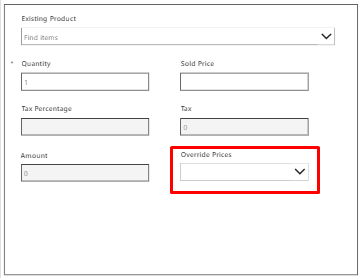
We have a requirement where there is a Field(Data Field: Two Options) on the form, which should show “NO” as Default value. The Field on the Form is a Combo Box.
Steps:
1. This is the form of Quote Product. We want to set Override Price as NO.
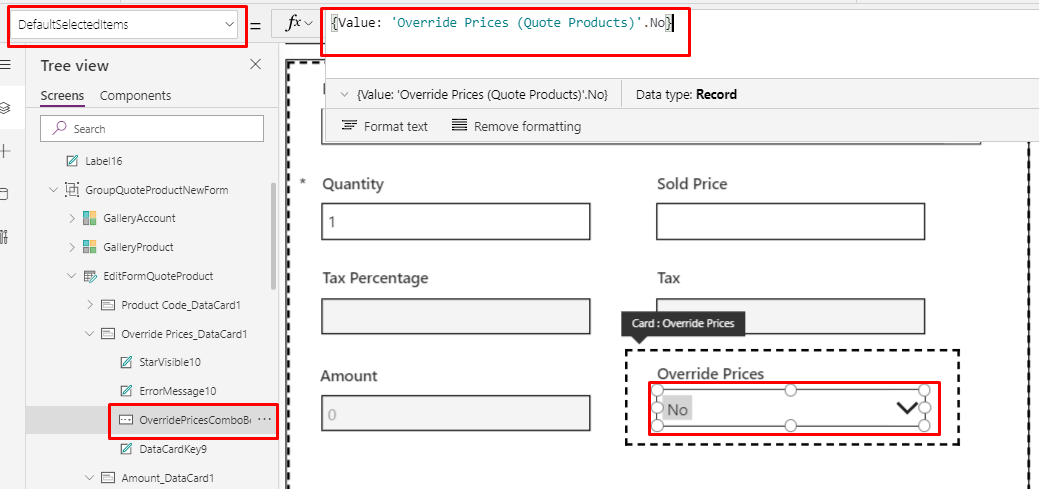
2. To set Default value of the field, click on the Combo Box.
DefaultSelectedItems property:
          Set OverridePrices.DefaultSelectedItems =  { Value: <Field Name>.No}

          For eg: OverridePricesComboBoxQPForm.DefaultSelectedItems = {Value: 'Override Prices (Quote Products)'.No}
Conclusion:
Hope the above Blog helps you to set Default Value of Two Options on New Form.
Related posts:

Resolving SSL/TLS Secure Channel Trust Errors in Dynamics 365 Finance and Operations

How to change a Bill of material (BOM) item on a production order

How to Set Up a Local Development Environment for D365 Finance and Operations Without Azure Costs
![Shopify Meets Dynamics 365 Finance and Operations: A Guide to Integration [Part 2]](https://www.cloudfronts.in/wp-content/uploads/2024/12/DALL·E-2024-12-14-12.29.44-A-professional-illustration-depicting-the-integration-between-Shopify-and-Dynamics-365-Finance-and-Operations.-The-image-shows-Shopify-on-one-side-wit-150x150.webp)
