

How to fix Client found response content type of ”, but expected ‘text/xml’
While running Integration map from Salesforce to AX we might encounter blank response received but expected text/xml.
In current use case existing user was deactivated and new user was added into salesforce.
To fix this kind of issue we can follow below steps:
- Login to the salesforce environment
- Go to setup

- Following screen will open and go to quick find and type “Outbound Message”
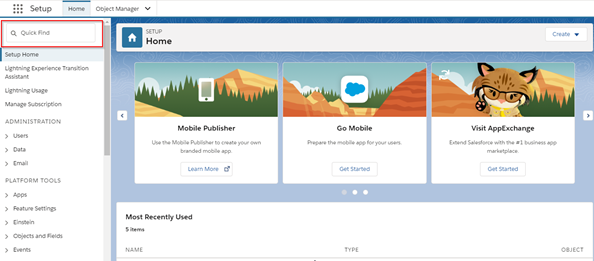
- Following screen will open click on continue

- Then you will see the outbound message list

- Click on edit and change user name
 In this way we can fix the blank response issue in salesforce.
Related posts:

Resolving SSL/TLS Secure Channel Trust Errors in Dynamics 365 Finance and Operations

How to change a Bill of material (BOM) item on a production order

How to Set Up a Local Development Environment for D365 Finance and Operations Without Azure Costs
![Shopify Meets Dynamics 365 Finance and Operations: A Guide to Integration [Part 2]](https://www.cloudfronts.in/wp-content/uploads/2024/12/DALL·E-2024-12-14-12.29.44-A-professional-illustration-depicting-the-integration-between-Shopify-and-Dynamics-365-Finance-and-Operations.-The-image-shows-Shopify-on-one-side-wit-150x150.webp)
