

Identify Users with System Administrator Role
Introduction:
In this blog, we are going to discuss how to find the users having the System Administrator role.
This can be done using the basic feature of CRM. Instead of checking all the Users separately and identifying the System Administrator(s) we can utilize the CRM feature of Advance Find.
Steps:
Step 1: Login to your CRM organization and click on Advanced Find located on the top toolbar as shown below.

Step 2:
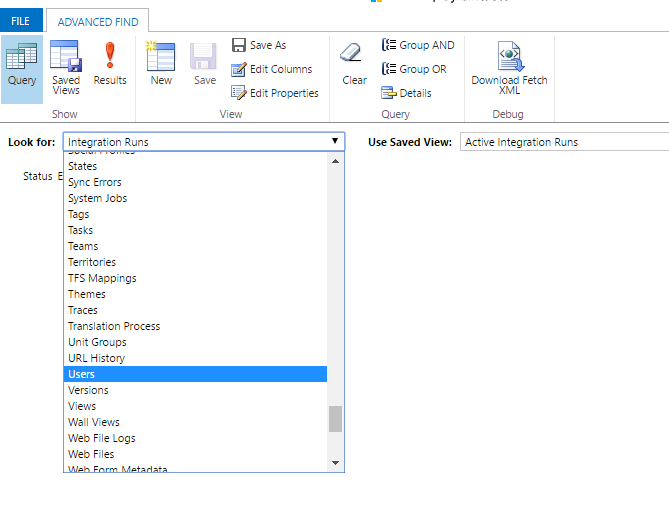
On the Advanced Find page, click the Look for: drop down as shown below, scroll down and select Users.
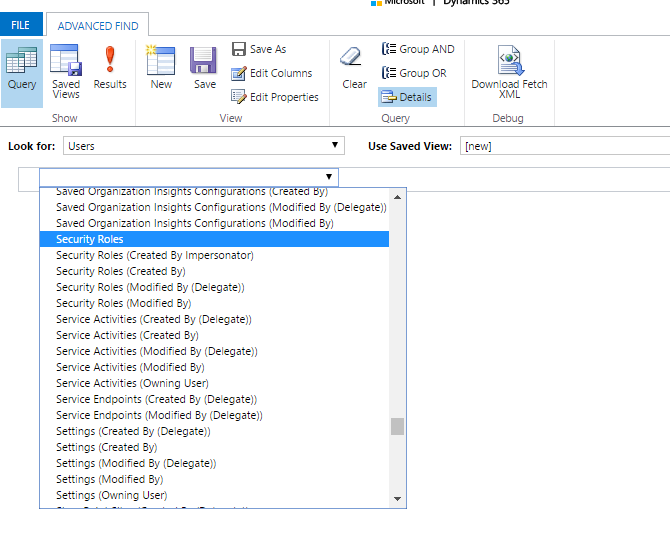
Step 3: Select Security Roles from the list.
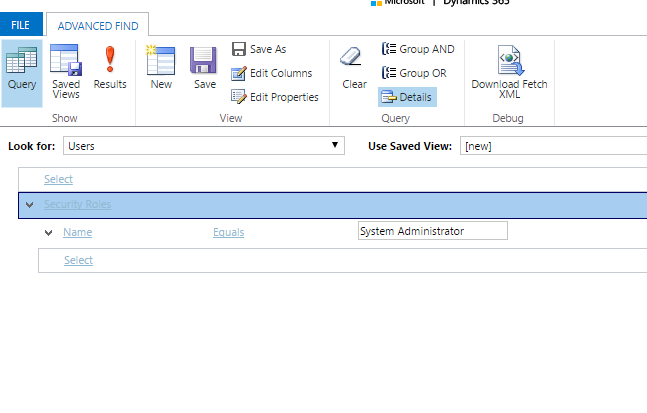
Step 4: After selecting Security Roles, under Fields select Name from the drop down
Step 5: Enter the search string in the enter text location “System Administrator” and click Result.
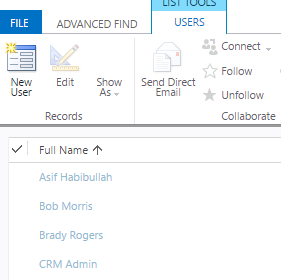
Step 6: Users with System Administrator role will be visible.
We hope this has given you a useful information.
Related posts:

Resolving SSL/TLS Secure Channel Trust Errors in Dynamics 365 Finance and Operations

How to change a Bill of material (BOM) item on a production order
![Shopify Meets Dynamics 365 Finance and Operations: A Guide to Integration [Part 2]](https://www.cloudfronts.in/wp-content/uploads/2024/12/DALL·E-2024-12-14-12.29.44-A-professional-illustration-depicting-the-integration-between-Shopify-and-Dynamics-365-Finance-and-Operations.-The-image-shows-Shopify-on-one-side-wit-150x150.webp)
Shopify Meets Dynamics 365 Finance and Operations: A Guide to Integration [Part 2]
