

How to insert hyperlink with friendly URL in Email Templates in CRM
Problem Statement
- Many times we came across the scenario to have links in email templates and make the email template better in presentation aspect with the help of HTML.
- This blog explains how can you add hyperlink with friendly URL in Email templates.
Business Scenario
- ‘Adventure Works’ company wants to send email notification to case owner on create of case with below email format.
- Click here should navigate user to URL stored in Custom URL field of Case entity.
- We will achieve this requirement with the help of email template.
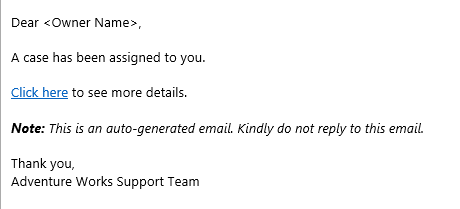
Note: We have not covered creation of workflows in this blog. We will use workflow on create of case record to send email using below email template.
Steps to create email template
- Go to Settings > Templates > Email Templates
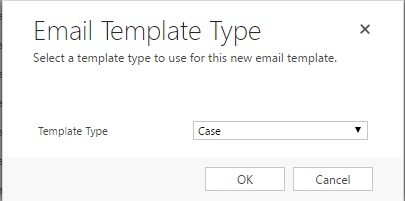
- Click New. Select Template Type as Case.
- Create template body as per below:
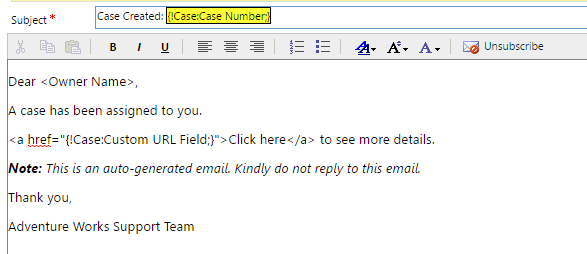
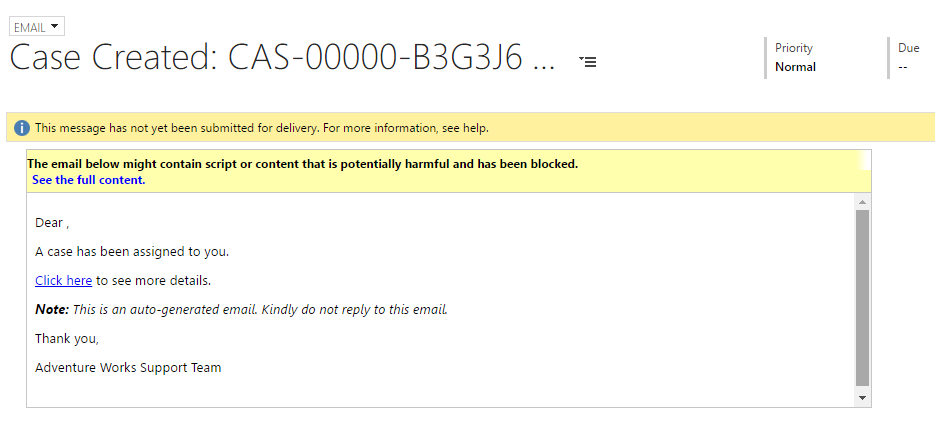
Below will be the output:
Related posts:

Resolving SSL/TLS Secure Channel Trust Errors in Dynamics 365 Finance and Operations

How to change a Bill of material (BOM) item on a production order
![Shopify Meets Dynamics 365 Finance and Operations: A Guide to Integration [Part 2]](https://www.cloudfronts.in/wp-content/uploads/2024/12/DALL·E-2024-12-14-12.29.44-A-professional-illustration-depicting-the-integration-between-Shopify-and-Dynamics-365-Finance-and-Operations.-The-image-shows-Shopify-on-one-side-wit-150x150.webp)
Shopify Meets Dynamics 365 Finance and Operations: A Guide to Integration [Part 2]
