

Custom Business Process Flow is not showing in UCI
Scenario:
We had created the custom Business Process Flow on order entity which was visible on web client but not in UCI.
For making it visible in UCI we must add that Business Process Flow in App.
Steps:
- Create new solution and add Existing App which you are using in that solution.
- Add Custom Business Process Flow in App.
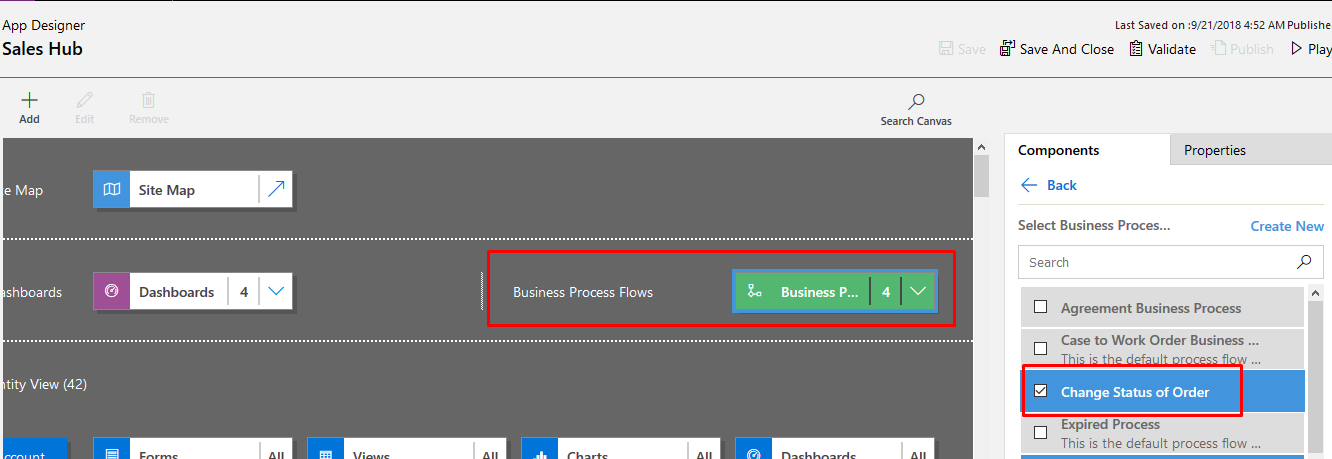
- Validate
- Save and Close.
- Publish All Customization.
Related posts:

Resolving SSL/TLS Secure Channel Trust Errors in Dynamics 365 Finance and Operations

How to change a Bill of material (BOM) item on a production order
![Shopify Meets Dynamics 365 Finance and Operations: A Guide to Integration [Part 2]](https://www.cloudfronts.in/wp-content/uploads/2024/12/DALL·E-2024-12-14-12.29.44-A-professional-illustration-depicting-the-integration-between-Shopify-and-Dynamics-365-Finance-and-Operations.-The-image-shows-Shopify-on-one-side-wit-150x150.webp)
Shopify Meets Dynamics 365 Finance and Operations: A Guide to Integration [Part 2]
