

Process to Provision Target Tool in Dynamics 365 Finance and Operations
Introduction:
When Copying a database between environments, you will need to run the Environment Re-Provisioning tool before the copied Database is fully functional, to ensure that all the Retail Components are up-to date.
Steps:
Steps to Process Re-Provisioning Tool:
1. Log into your LCS Project.
2. Go to Asset Library.
3. Select “Software Deployment Package”.
4. Click on Import.
5. Select “Environment Provisioning Tool”.
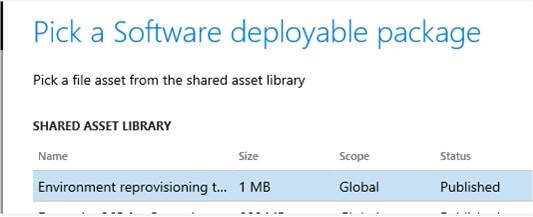
6. Click Pick.
7. Once this Package is available in your Asset Library, Upload this package to your system and schedule it to run as you do for any other deployable package.
8. Go to Maintain and Apply updates.
Related posts:

Resolving SSL/TLS Secure Channel Trust Errors in Dynamics 365 Finance and Operations

How to change a Bill of material (BOM) item on a production order

How to Set Up a Local Development Environment for D365 Finance and Operations Without Azure Costs
![Shopify Meets Dynamics 365 Finance and Operations: A Guide to Integration [Part 2]](https://www.cloudfronts.in/wp-content/uploads/2024/12/DALL·E-2024-12-14-12.29.44-A-professional-illustration-depicting-the-integration-between-Shopify-and-Dynamics-365-Finance-and-Operations.-The-image-shows-Shopify-on-one-side-wit-150x150.webp)
