

Override Form DataSource method using Extensions in D3fO
In this blog article, we will see how we can override Form Data source method using Extensions in Dynamics 365 Operations. Now as recommended by Microsoft we must avoid Overlayering and instead use Extension. For extension, we have to use pre or post event handlers methods. In this blog we will create event handler of OnActivated() method of SalesLine DataSource of form SalesTable.
Create a new Class:
class CFSActivateButton
{

}
Copy and paste OnActivated() event handler of SalesTable DataSource in Class:
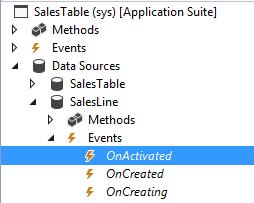
/// <summary>
/// To activate or deactivate Create Service Order button based on CFSProjId field of SalesLine
/// </summary>
/// <param name="sender"></param>
/// <param name="e"></param>

[FormDataSourceEventHandler(formDataSourceStr(SalesTable, SalesLine), FormDataSourceEventType::Activated)]
public static void SalesLine_OnActivated(FormDataSource sender, FormDataSourceEventArgs e)
{

        FormDataSource      fds = sender.formRun().dataSource("SalesLine");
        SalesLine           salesline = fds.cursor();
        FormRun             fr = sender.formRun();
        FormControl         fc = fr.design(0).controlName("CreateServiceOrder");

        if(salesLine.ProjID)
        {
            fc.enabled(true);
        }
        else
        {
            fc.enabled(false);
        }
    }
Related posts:

Resolving SSL/TLS Secure Channel Trust Errors in Dynamics 365 Finance and Operations

How to change a Bill of material (BOM) item on a production order

How to Set Up a Local Development Environment for D365 Finance and Operations Without Azure Costs
![Shopify Meets Dynamics 365 Finance and Operations: A Guide to Integration [Part 2]](https://www.cloudfronts.in/wp-content/uploads/2024/12/DALL·E-2024-12-14-12.29.44-A-professional-illustration-depicting-the-integration-between-Shopify-and-Dynamics-365-Finance-and-Operations.-The-image-shows-Shopify-on-one-side-wit-150x150.webp)
