

Issue : Database Sync Error while applying deployable packages or Updates.
Issue : Database Sync Error while applying deployable packages or Updates.
Usually the Database sync error occurs at step 11:GlobalUpdate script for service model: AOSService on machine: —-
Follow the steps to resolve the issue and resume the deployment.
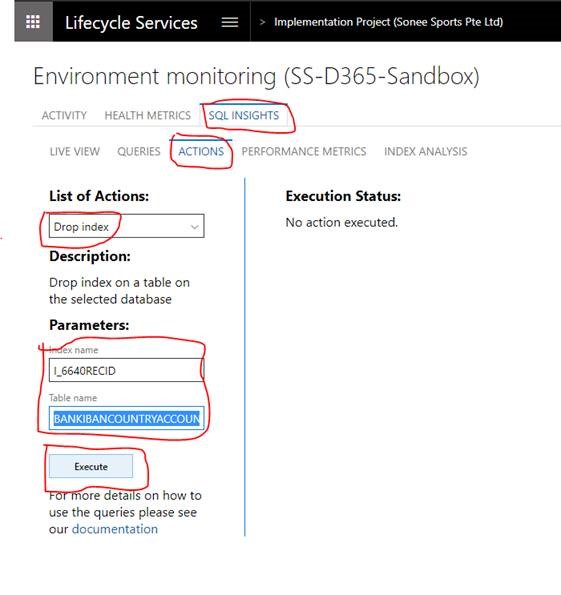
- In this environment, go to Environment Monitoring –> SQL INSIGHTS –> ACTIONS tab
- In List of Actions, choose “Drop index”
- In Parameters, input “I_6640RECID” and “BANKIBANCOUNTRYACCOUNTSTRUCTURE” in Index name & Table name respectively.
- Choose Execute to drop the index then resume deployment.
Related posts:

Resolving SSL/TLS Secure Channel Trust Errors in Dynamics 365 Finance and Operations

How to change a Bill of material (BOM) item on a production order

How to Set Up a Local Development Environment for D365 Finance and Operations Without Azure Costs
![Shopify Meets Dynamics 365 Finance and Operations: A Guide to Integration [Part 2]](https://www.cloudfronts.in/wp-content/uploads/2024/12/DALL·E-2024-12-14-12.29.44-A-professional-illustration-depicting-the-integration-between-Shopify-and-Dynamics-365-Finance-and-Operations.-The-image-shows-Shopify-on-one-side-wit-150x150.webp)
