

How to change the no. of decimal points for a particular field in Dynamics 365 for Finance and Operation
Introduction:
In Dynamics 365 for finance and operations the default decimal point is set up till 2 decimal place. To change the decimal point according to customers wish follow the following steps.
Steps:
1. In the development environment run the Visual studio in administration mode.
2. In AOT find the EDT of the field and change the No of Decimals Property to 4-6 depending on the customers requirement.
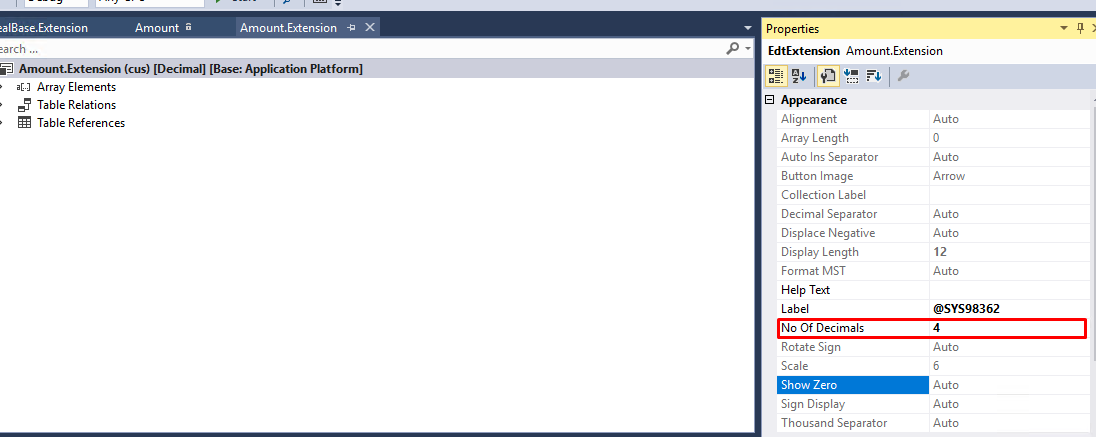
3. Compile and build the solution.
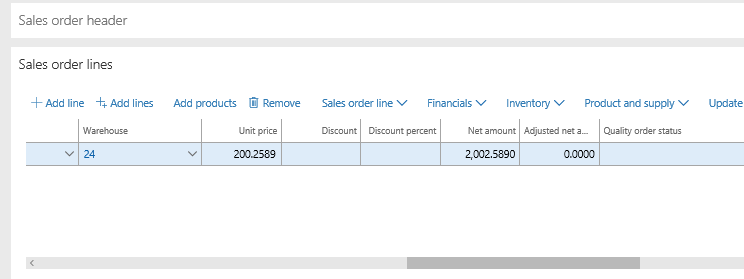
4. The changes will be visible on Dynamics 365 finance and operations.
Related posts:

Resolving SSL/TLS Secure Channel Trust Errors in Dynamics 365 Finance and Operations

How to change a Bill of material (BOM) item on a production order

How to Set Up a Local Development Environment for D365 Finance and Operations Without Azure Costs
![Shopify Meets Dynamics 365 Finance and Operations: A Guide to Integration [Part 2]](https://www.cloudfronts.in/wp-content/uploads/2024/12/DALL·E-2024-12-14-12.29.44-A-professional-illustration-depicting-the-integration-between-Shopify-and-Dynamics-365-Finance-and-Operations.-The-image-shows-Shopify-on-one-side-wit-150x150.webp)
