

Form Personalization in D365 Operations
In AX 2012, we had an option Personalize to view the form and form control layout; Form, DataSource and field details; Add and manage form design. In this blog article, we will see how we can find form and form control details in Dynamics 365 for Operations.
In this blog we will view the Customer Name – form control details.
1. Go to Accounts Receivable -> All customers -> Right click on the ‘Name’ field.
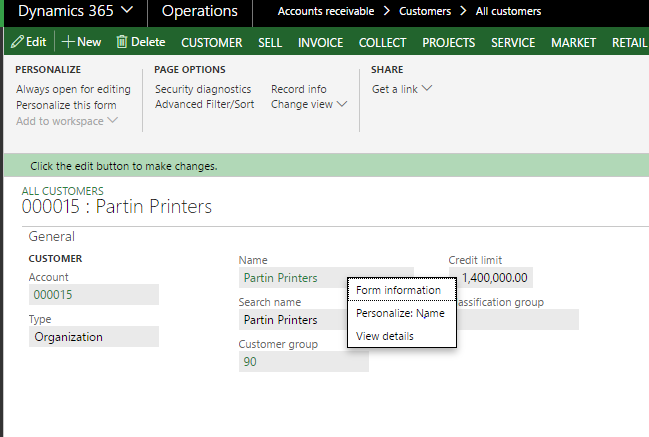
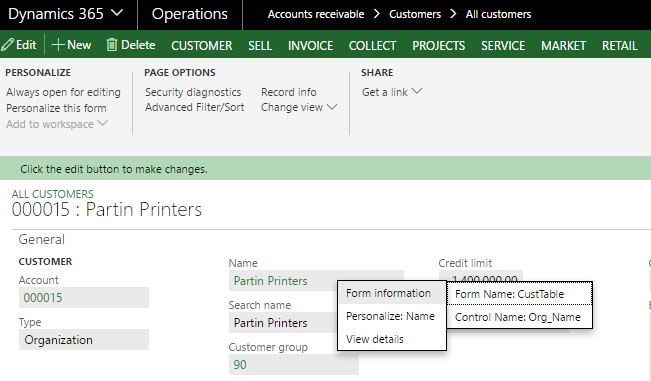
2. Select Form Information -> Form Name
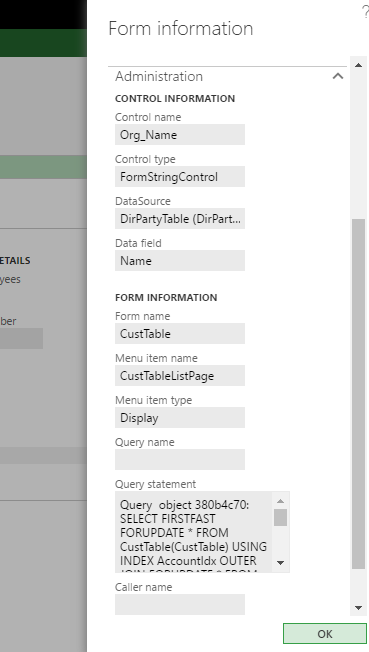
3. In Form Information go to Administration Fast Tab. You can find all details regarding form control – Customer name.
Related posts:

Resolving SSL/TLS Secure Channel Trust Errors in Dynamics 365 Finance and Operations

How to change a Bill of material (BOM) item on a production order

How to Set Up a Local Development Environment for D365 Finance and Operations Without Azure Costs
![Shopify Meets Dynamics 365 Finance and Operations: A Guide to Integration [Part 2]](https://www.cloudfronts.in/wp-content/uploads/2024/12/DALL·E-2024-12-14-12.29.44-A-professional-illustration-depicting-the-integration-between-Shopify-and-Dynamics-365-Finance-and-Operations.-The-image-shows-Shopify-on-one-side-wit-150x150.webp)
