

Add custom Table method on Form in D3FOE
Background:
As we know, we can only work with Extension code in D365 Finance and Operations. In this blog article, we will see how we can add a custom display method to a Table and display it on form using Extension.
Steps:
- Create a new Class
- Add Display method
- Display the method on form
1. Create a new Class:
- Go to Solution Explorer -> Project
- Right Click -> Select ‘Add new Item’
- Select Class -> Enter Name. Class name can be anything ending with ‘_Extension’. Eg. <ClassName>_Extension
- Click Ok
2. Add Display method:
Public Static class CFLoyaltyaddphone_Extension // Class must be static

{

    [SysClientCacheDataMethodAttribute (true)]  //This statement will cache display method

    public static display LogisticsElectronicAddressLocator CFS_GetPhoneno (RetailLoyaltyCard _this) //Pass Tablename as Parameter

    {

        DirpartyTable dirPartyTable;

        Dirpartylocation dirpartylocation;

        LogisticsElectronicAddress logisticsElectronicAddress;

        select * from dirpartylocation

            where  dirpartylocation.Party == _this.Party

            join logisticsElectronicAddress

            where logisticsElectronicAddress.Location == dirpartylocation.Location

            && logisticsElectronicAddress.IsPrimary == NoYes::Yes

            && logisticsElectronicAddress.Type == LogisticsElectronicAddressMethodType::Phone ;

         return logisticsElectronicAddress.locator; //Return Field value

    }

}
3. Display the method on Form:
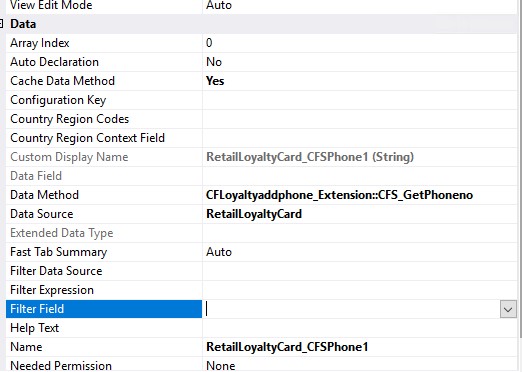
- Add the field type on form Design.
- Change the below property
Related posts:

Resolving SSL/TLS Secure Channel Trust Errors in Dynamics 365 Finance and Operations

How to change a Bill of material (BOM) item on a production order

How to Set Up a Local Development Environment for D365 Finance and Operations Without Azure Costs
![Shopify Meets Dynamics 365 Finance and Operations: A Guide to Integration [Part 2]](https://www.cloudfronts.in/wp-content/uploads/2024/12/DALL·E-2024-12-14-12.29.44-A-professional-illustration-depicting-the-integration-between-Shopify-and-Dynamics-365-Finance-and-Operations.-The-image-shows-Shopify-on-one-side-wit-150x150.webp)
