

Create attachments in SharePoint when email arrives
Use case – we wanted to retrieve attachment when new email arrives in outlook and create same file in SharePoint
Let see how we can achieve this!
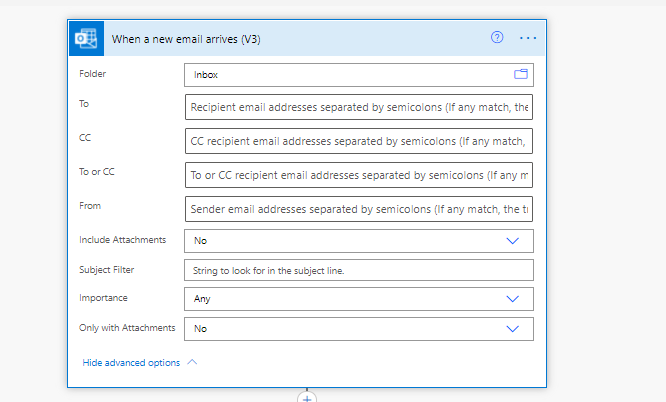
Step 1 – Flow triggers on when a new email arrives trigger from Outlook connection.
Step 2 – Retrieve attachments and Create file in SharePoint.
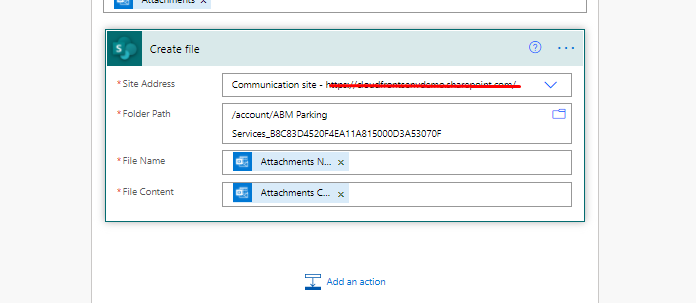
Add step create file from SharePoint connection.
In Create file, Add site address, Folder path, File name, File Content.
Here file Content is the Attachment content from Trigger and File Name should be Attachment name.
Save the flow and try.
Hope this helps!
Related posts:

Resolving SSL/TLS Secure Channel Trust Errors in Dynamics 365 Finance and Operations

How to change a Bill of material (BOM) item on a production order
![Shopify Meets Dynamics 365 Finance and Operations: A Guide to Integration [Part 2]](https://www.cloudfronts.in/wp-content/uploads/2024/12/DALL·E-2024-12-14-12.29.44-A-professional-illustration-depicting-the-integration-between-Shopify-and-Dynamics-365-Finance-and-Operations.-The-image-shows-Shopify-on-one-side-wit-150x150.webp)
Shopify Meets Dynamics 365 Finance and Operations: A Guide to Integration [Part 2]
