

Copying Data From A Table/Matrix in Power BI : September 2018 Update
Introduction
The September 2018 Update of Power BI has finally brought to users, the functionality to copy data from a table or matrix in a report.
This has been a much-requested feature as one often finds themselves needing to copy a value or columns of data from a report with no option to do so.
Steps:
Now, if you want to copy a value, several columns in a table or matrix you can do so by following the steps below:
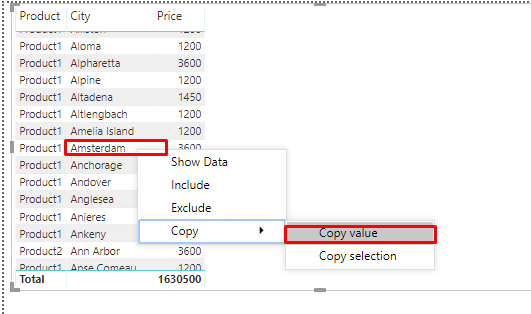
- Copying one value : Select the value->right-click on the selection -> select ‘Copy Value’ -> An unformatted value will now be added to your clipboard.

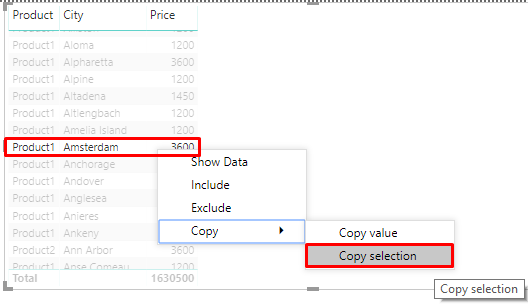
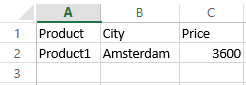
- Copying several columns of data: Select all the data in the required columns->right click on the selection and select ‘Copy Selection’.-> The required data and column headers are copied to the clipboard.
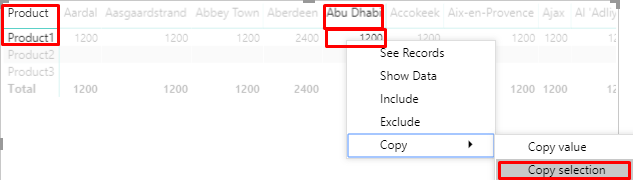
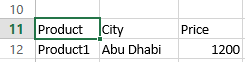
- In a Matrix, when you select one value->right-click-> ‘Copy Selection’-> All measures required are copied along with the value ( as shown in the screenshot below).
Conclusion:
This is a long-awaited feature of Power BI and will definitely enhance user experience while navigating and using Power BI reports.
Related posts:

Resolving SSL/TLS Secure Channel Trust Errors in Dynamics 365 Finance and Operations

How to change a Bill of material (BOM) item on a production order

Shopify Meets Dynamics 365 Finance and Operations: A Guide to Integration [Part 2]